
Hello @IndiaBetaTeam ,
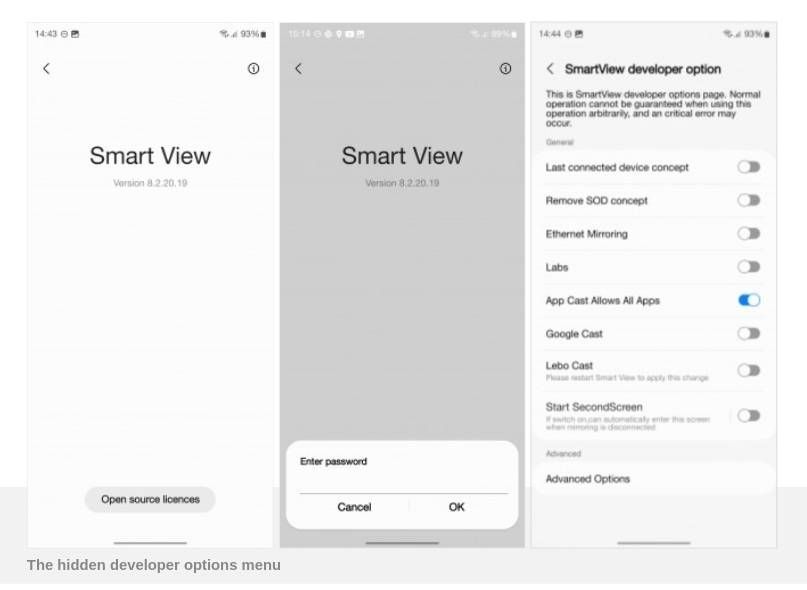
In One UI 5.1 , I was able to access SmartView Developers option hidden menu by Tapping 10 times on Smart View and when you are asked for a password, enter #00rtsp00.
Reference screenshot from OneUI 5.1:
Now, that option is not there in OneUI 6. (At least, I couldn't find it)
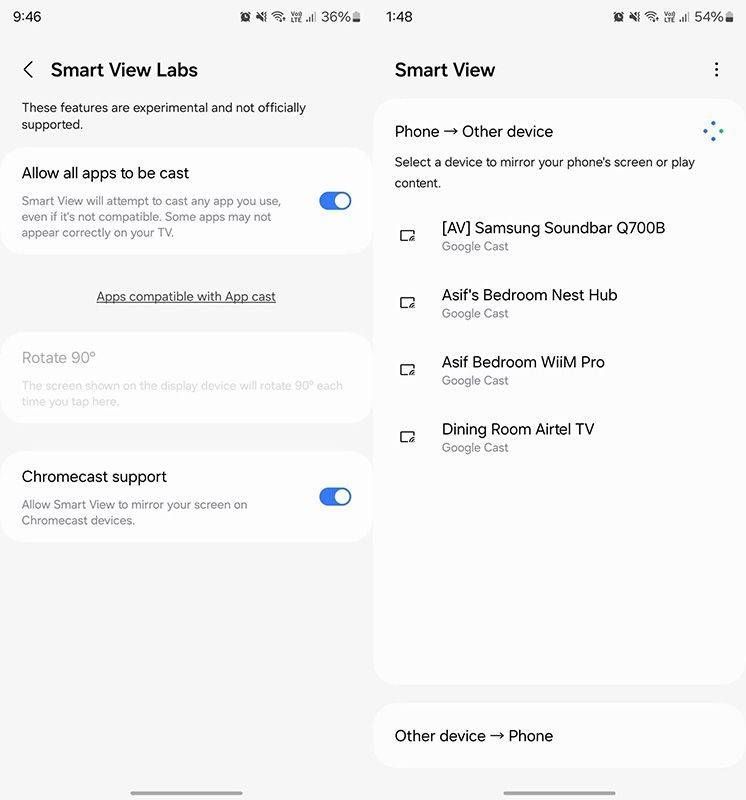
I did my own research and found that as per SamMobile, the feature isn't enabled by default but can be quickly switched on by navigating to Settings > Connected devices > Smart View, heading to Smart View Labs by tapping the three dots in the top right, then enabling Chromecast support.
Reference screenshot for One UI 6:
But unfortunately that is also not there in Z Fold 5 OneUI 6 yet.
Is this feature yet to come in future beta builds for Z Fold 5 or it's not there anymore ?
Please dont reply with same copy paste message. I know how to take logs and send to you. Here the feature is not there at all so sending logs is not the solution.
I am just curious if this feature unavailable temporarily or gone for a toss😶
No replies and comments found