
I like Samsung, but the Tab A9+ is by far the worst Galaxy product I have ever bought. I got it 5 months ago, thinking it would get updates till One UI 9. But later, I realized it will not be getting it. It will only get One UI security updates till 2027, and it will be stuck on One UI 8.5 if it even receives that. Software updates have been really slow also. My S24 is on December Patch, but this tablet is still on October patch, and it still has some bugs. Performance on paper is decent (mine is 8GB RAM), but because One UI is a very heavy unoptimised operating system, it lags just scrolling around the UI. Turning off RAM PLUS helped reduce the lag, but it's still very noticeable. I think my A15 5G that is less powerful is slightly smoother. And the worst thing about this tablet, the biggest problem, is WI-FI STABILITY. The Wi-Fi range is horrible, and the speed is atrocious. My S24 gets over 300mbps in download speed, this garbage gets no joke 8mbps. Extremely disappointed with this purchase. And I will not buy the A11+, because that, on paper, has the same exact wifi system. S10 Lite is the best option.
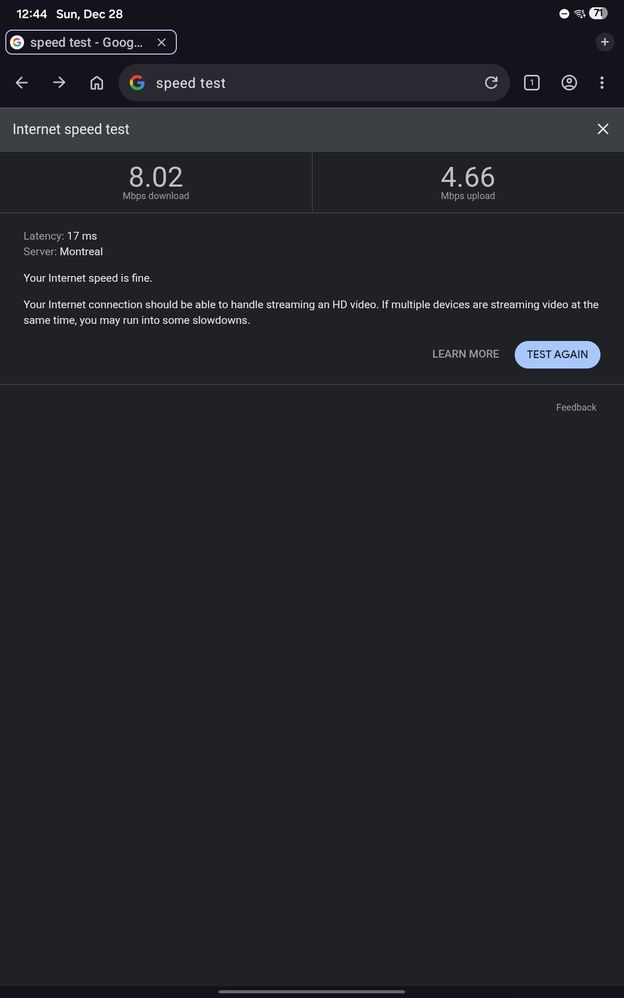
Galaxy Tab A9+
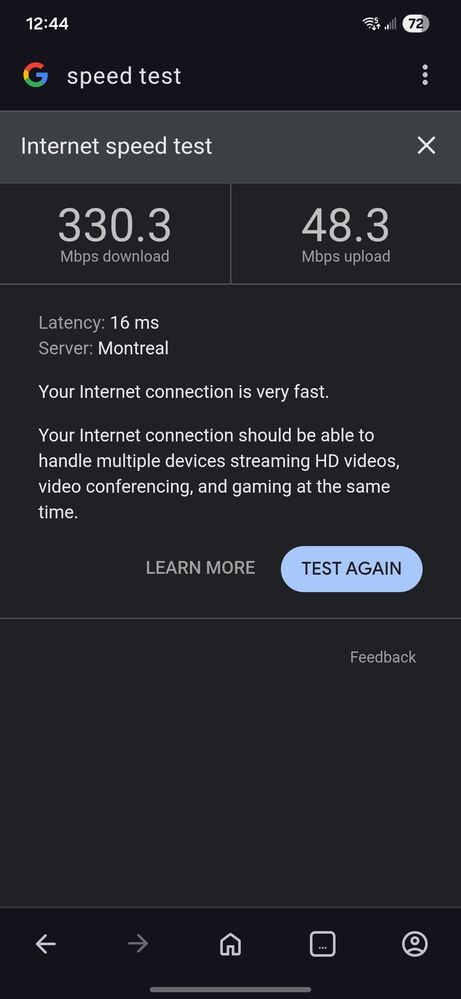
Galaxy S24
RedDogRabbit
Expert Level 5
2025/12/28 06:11 PM
in
Your S24 is a Flagship device, the Tab A9+ is a budget device
The Tab A9+ was only ever going to be updated to Android 15, One UI V7.0.
Samsung Galaxy Tab A9+ - Full tablet specifications https://share.google/FMrzka2mOvWbsnqzD
0 likes
KikiKaka
Active Level 3
2025/12/28 06:15 PM
in
0 likes
RedDogRabbit
Expert Level 5
2025/12/28 06:54 PM
in
Did you try Resetting the Network Settings on your Tablet?
0 likes
KikiKaka
Active Level 3
2025/12/28 06:55 PM
in
0 likes
RobertZ
Expert Level 1
2025/12/28 08:43 PM
in
KikiKaka
Active Level 3
2025/12/28 08:55 PM
in
0 likes
RobertZ
Expert Level 1
2025/12/28 10:42 PM
in
0 likes
Ayyman
Moderator
2025/12/29 06:53 PM
in
Hi KikiKaka,
We truly understand how frustrating it can feel when a device does not meet your expectations, especially when it comes to software updates, performance, and Wi-Fi stability.
To help resolve the matter, we recommend performing the steps outlined below.
Software Updates: The Tab A9+ is scheduled to receive security updates until 2027. While major One UI upgrades may be limited, we recommend ensuring your device is always updated to the latest available patch via Settings > Software Update.
Performance Optimization: Since youve already tried disabling RAM Plus, you may also benefit from running Device Care (Settings > Battery and Device Care > Optimize) to clear background processes. Reducing animations under Settings > Accessibility > Visibility Enhancements can also improve smoothness.
Bug Fixes: If you continue to notice issues after updates, submitting feedback through the Samsung Members app (Get Help Feedback Feature Request), which ensures your ideas are formally documented and considered.
We will make sure it is shared with the relevant teams. If the Wi-Fi issue persists despite these steps, we recommend visiting a Samsung Service Center so our technicians can run a full diagnostic.
0 likes
Members_KOEivvN
Beginner Level 2
2026/10/5 05:41 PM
in
We have 2 A9 tablets started out great. One was always super slow to charge. The second one will not charge at all now. I did all the troubleshooting available and its dead. What a waste of $$
0 likes
KikiKaka
Active Level 3
2026/10/5 05:55 PM
in
0 likes
xdaDeveloper2013
Beginner Level 1
2026/10/30 09:09 AM
in
I realize this is an older post. But yours is a perplexing post to say the least. The Galaxy Tab A9+ is one of the best tablets I have ever owned in terms of bang for the buck. I have the 4GB/64GB variant with the Snapdragon 695 SoC, and mine is lightning fast: no lag, smooth rendering, and reasonable multitasking capabilities. As far as connectivity, I have experienced no WLAN or cellular data instabilities whatsoever. My A9+ actually outperforms my A11+ in terms of overall performance. Are you 100% certain you know how to use an Android-based tablet? I don't ask that to be condescending or rude, so pleaae dont take me wrong. No disrespect intended. But, you would be surprised at how many device owners don't know how to uninstall/delete unused or unwanted apps, how to implement RAM Plus, or how to properly calibrate their device battery in order to optimize power efficiency which, in turn, enhances overall performance. There are several essential user-end OS tweaks that can optimize the true hardware capabilities of a tablet or smartphone, maximizing performance, RAM management and power efficiency. Out of curiosity, what is your model number/branded carrier? I have the U1 model myself.
0 likes