
Hello, I have a question. So I have updated my Samsung Galaxy S25 Ultra to the latest OneUI 9 software. After the update, my Samsung Gallery got this new Google Cloud Sync integration feature and all of my photos and videos are now synced to my Google photos.
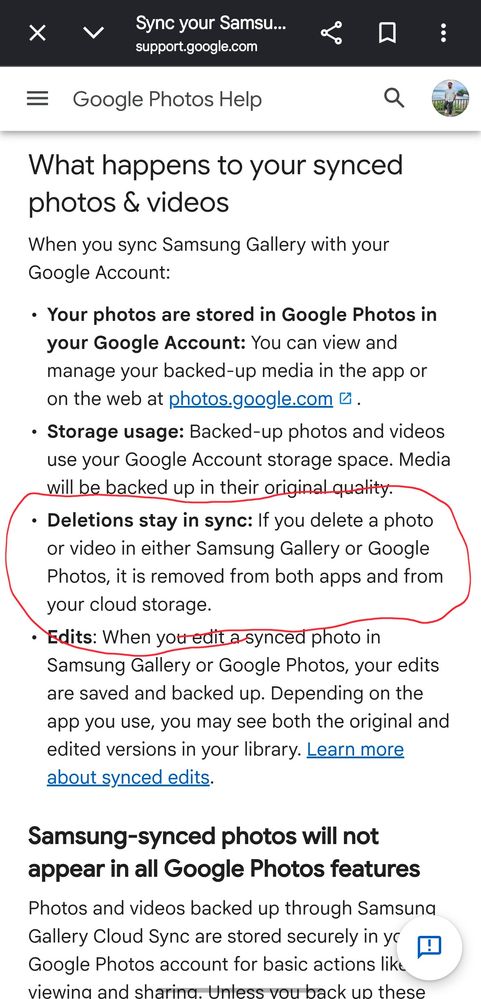
But, here is my question. If I want to delete (already backed up) photos and videos to clean up my local phone storage, how can I do that? With this new integration, I thought "Free up Space" button in Google Photos will work exactly the same way it used to work before, but it does not do anything now. Because I read an article on Google's website that deleting it will also delete my data from Google Photos backup. This does not make any sense.
Does this mean I cannot delete my data just to free up my phone storage?
Here is the reference link.
Sync your Samsung Gallery with your Google Account - Google Photos Help https://share.google/bL7s0kSic5vy178RZ
SavvySavoie
Active Level 6
2026/10/19 04:10 PM
in
0 likes
RobertZ
Expert Level 1
2026/10/19 05:10 PM
in
0 likes
Mirek
Active Level 7
2026/10/19 08:20 PM
in
0 likes
Mirek
Active Level 7
2026/10/19 08:22 PM
in
0 likes
Haisley
Moderator
2026/10/19 09:29 PM
in
Hi Malav,
To safely free up space on your phone without losing your cloud backup, you need to use the "Free up phone storage" tool built directly inside your Samsung Gallery settings.
With the new update, your Samsung Gallery and Google Photos are locked in a two-way sync. This means if you just hit "delete" normally on your phone, it will delete the photo from your cloud backup too. Because of this new link, the "Free up Space" button inside the Google Photos app no longer works.
Here is how you can easily and safely clear your phone's storage:
The Best Way: Use Samsung's Built-in Tool
1. Open your Samsung Gallery app.
2. Tap the Menu (three lines) in the bottom right, then tap Settings.
3. Tap Free up phone storage (or Manage storage).
4. The app will safely remove the local files from your phone while keeping your copies 100% safe in Google Photos.
The Manual Way (Turn Off Sync)
If you only want to delete certain photos from your phone:
1. Go to Samsung Gallery Settings > Sync with Google and turn it OFF.
2. Delete the photos you want off your phone.
Note: Keep the sync turned off, otherwise turning it back on might delete those photos from the cloud too. You can still view all your backed-up photos anytime by opening the Google Photos app directly!
0 likes
Samsung_BMl0PLG
Beginner Level 4
2026/10/25 09:23 PM
in
Estou com o mesmo problema aqui, estou com o S23 na OneUi 9.0.
0 likes
Haisley
Moderator
2026/10/25 11:32 PM
in
To assist you further, could you please provide your query in either English or French, as these are the languages supported by Samsung Canada? This will help us ensure that we can address your concern accurately and efficiently.
0 likes
Benjines
Beginner Level 1
2026/11/9 10:44 AM
in
Hi, i have the same problem with the missing free up space option in my Samsung gallery settings. Where can I find it?
0 likes