Original topic:

Driving Report

(Post creation time:  

2026/10/23 05:47 PM

)

144 Views

K

KolyaAP

Active Level 1

last edited


2026/10/23 05:47 PM


in

 
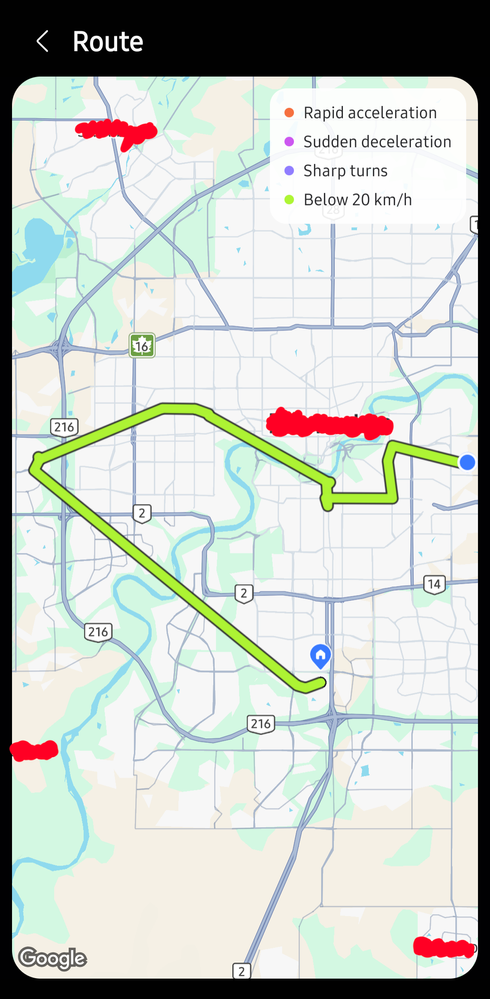
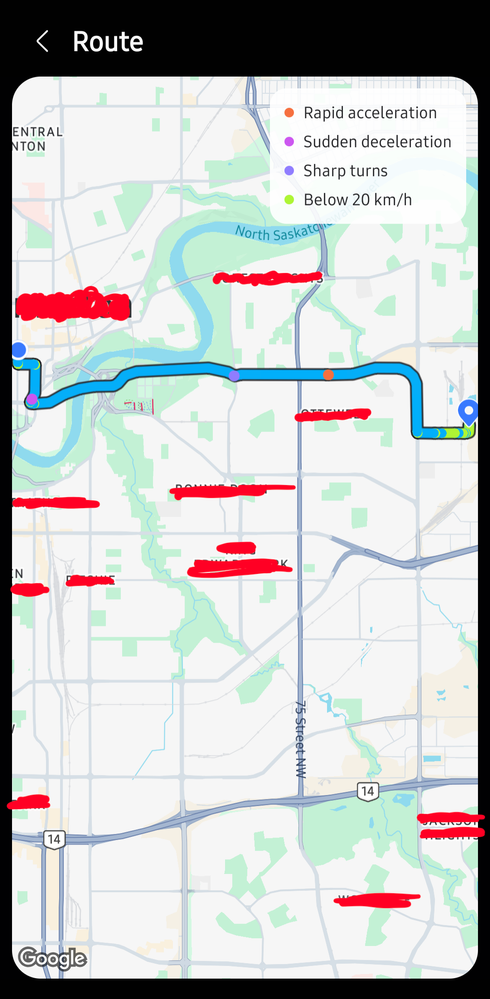
Has one else been having difficulties with the driving report feature (One UI 9)? It sometimes does show my exact route and then other times it just gives up showing my exact route.
image
Example of the accurate one


image
Inaccurate to the point where the route shows that I drive through homes and for some reasons thinks that I only do 20km/h or under.

Had anyone else been experiencing this or am I the chosen one? 😅
    • F

      FireFlash

      Active Level 3

      2026/10/23 08:49 PM


      in

       
      I sense what you are seeing is satellite connectivity issues to your phone. I've seen it happen before.
      K

      KolyaAP

      Active Level 1

      2026/10/24 03:35 AM


      in

       
      But is there a way to fix it?

      0 likes

      F

      FireFlash

      Active Level 3

      2026/10/24 11:34 PM


      in

       
      Unfortunately. I expect this to happen more often as global realignment increases. Service distribution will be expected. Especially since you are using Google Maps and their services are becoming dodgy and unreliable. Best we can do is use alternative apps.

      0 likes

      K

      KolyaAP

      Active Level 1

      2026/10/25 12:19 AM


      in

       
      What other map services are there?

      0 likes

    • F

      FireFlash

      Active Level 3

      2026/10/25 12:36 AM


      in

       
      Organic Maps is one possibility, as is Map Quest. Keep in mind that if you are expecting functionality like Google Maps. It will take time for new digital map systems to be developed for consumer use.

      0 likes

    • Z

      Zolten

      Moderator

      2026/10/25 10:07 AM


      in


      Hello KolyaAP,

      We want to make sure your Driving Report feature performs perfectly. To optimize your device's background tracking and ensure the most accurate route mapping and speed calculations, please try these quick steps:

      • Turn on Precise Location: Go to Settings > Apps, select the app running your Driving Report, tap Permissions > Location, and choose Allow all the time with Use precise location
      • Optimize Battery Settings: In that same app settings menu, tap Battery and change it to Unrestricted to ensure uninterrupted GPS performance throughout your entire drive.'
      • Check the app is updated to the latest version.

      Please follow the steps and let us know if the issue still persists.

      K

      KolyaAP

      Active Level 1

      2026/11/5 03:43 PM


      in


      It has minimized the issue drastically! Thank you!

      0 likes