
While many tech channels promote disabling transparency and animations as an "instant performance boost", doing so often sacrifices the refined look and feel of modern operating systems for negligible gain on contemporary hardware.
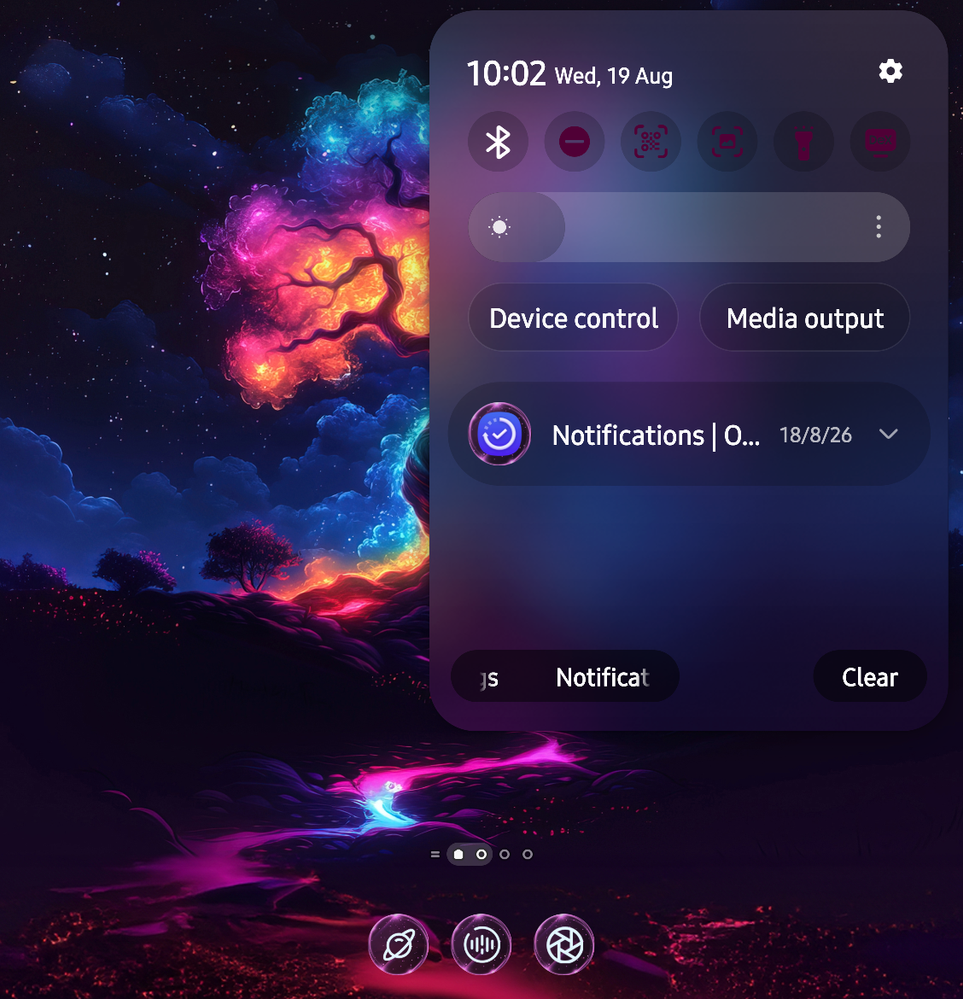
Blur & Transparency Active: The drop-down panel creates a sophisticated frosted glass effect over your wallpaper.
Aesthetic Polish (Default) VS. Flat Contrast (Disabled)
Frosted glass depth • Opaque block backgrounds
Spatial awareness • Abrupt visual cuts
Fluid motion feedback • Immediate response
Blur & Transparency Active: The drop-down panel creates a sophisticated frosted glass effect over your wallpaper.
It maintains background context while keeping foreground elements legible and visually separated.
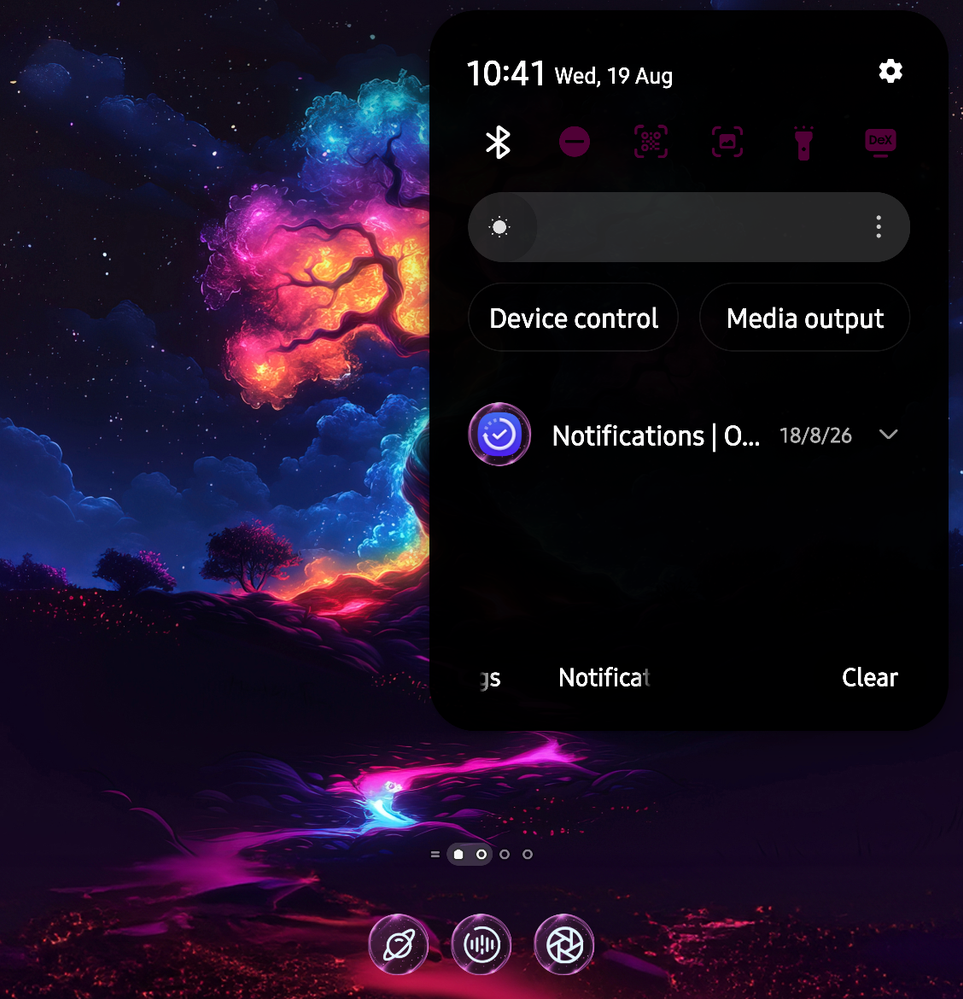
Blur Disabled: The panel becomes a stark, solid black box.
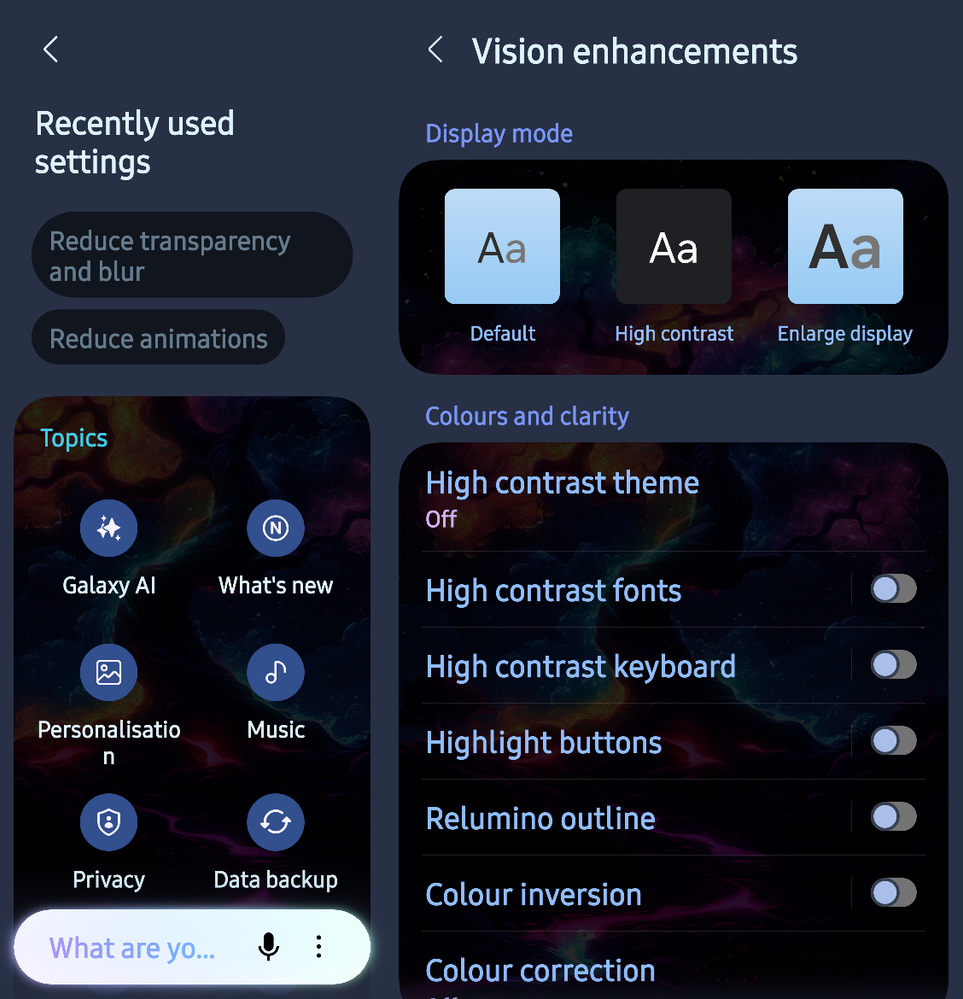
Accessibility Settings: Options such as Reduce transparency and blur and Reduce animations are primarily designed as accessibility features helping users who experience motion sickness or require high-contrast interfaces, rather than everyday performance tweaks.
Why This Advice Persists (and Why It Is Outdated)
1. Legacy GPU Hardware vs. Modern Power
On older devices with limited memory bandwith, calculating real-time Gaussian blurs and rendering complex 120 Hz frame transitions could drop frame rates.
If you want a fast, responsive device without compromising its cosmetic design try these -
While useful for high-contrast visibility, it strips away visual layer depth and destroys the cohesive aesthetic of the system design.
1. Legacy GPU Hardware vs. Modern Power
On older devices with limited memory bandwith, calculating real-time Gaussian blurs and rendering complex 120 Hz frame transitions could drop frame rates.
Modern mobile processors handle hardware-accelerated blurs effortlessly without impacting battery life or system responsiveness.
2. Perceived Speed vs. Fluid Motion
Removing animations entirely makes interface switches jarring.
2. Perceived Speed vs. Fluid Motion
Removing animations entirely makes interface switches jarring.
Smooth micro-interactions provide subtle tactile feedback to signal where an application originated from or disappeared to.
3. Modern AI & System Integration
Modern UI paradigms rely heavily on visual layers to blend system tools, notifications, and AI support widgets seamlessly over active tasks.
3. Modern AI & System Integration
Modern UI paradigms rely heavily on visual layers to blend system tools, notifications, and AI support widgets seamlessly over active tasks.
Stripping these visual cues turns a cohesive design language into a fragmented one.
Smarter Alternatives for Optimisation
Smarter Alternatives for Optimisation
If you want a fast, responsive device without compromising its cosmetic design try these -
Set Animation Scale to 0.5 times: Enable Developer Options in your settings and adjust Window animation scale, Transition animation scale, and Animator duration scale from 1 imes to 0.5 imes (Older mobile devices).
This preserves all transition effects and spatial motion while cutting the duration in half.
Fine-tune with Good Lock: On Samsung devices, use modules like Home Up or Theme Park to customise blur intensity and animation curves without disabling them completely (Newer mobile devices).
Thank you.
This preserves all transition effects and spatial motion while cutting the duration in half.
Fine-tune with Good Lock: On Samsung devices, use modules like Home Up or Theme Park to customise blur intensity and animation curves without disabling them completely (Newer mobile devices).
Thank you.
NSter
Expert Level 5
Wednesday, August 19th, 2026 06:41 AM
in
Does this ring a bell?
📱⏳️📱
Protonumus
Expert Level 1
Wednesday, August 19th, 2026 06:49 AM
in
NSter
Expert Level 5
Wednesday, August 19th, 2026 06:53 AM
in
Thank you for clarifying
🙏🏽💯🙏🏽
Protonumus
Expert Level 1
Wednesday, August 19th, 2026 10:59 PM
in
HS_NzAu
★
Wednesday, August 19th, 2026 09:15 AM
in
Protonumus
Expert Level 1
Wednesday, August 19th, 2026 10:59 PM
in
BennyBoy66
Active Level 5
Wednesday, August 19th, 2026 09:53 PM
in
Protonumus
Expert Level 1
Wednesday, August 19th, 2026 10:59 PM
in