
title:

Quick panel issue

(Post creation time:  

Friday, March 6th, 2026 10:12 AM

)

857 Views

C

C00P

Beginner Level 2

last edited


Friday, March 6th, 2026 10:14 AM


in

 
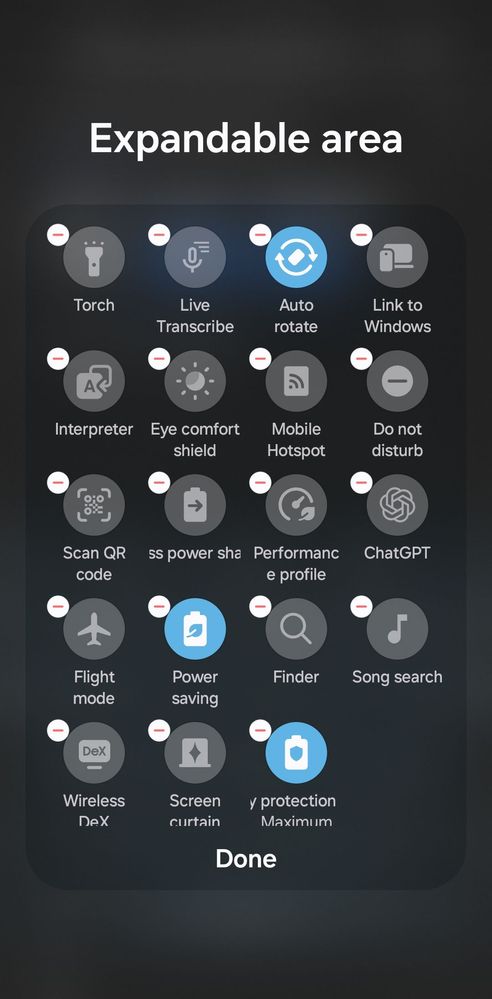
Hi people, i just got the new galaxy s26 ultra and im trying to customise the quick pannel to add some things i commonly use but the add section isn't where it normally is at the bottom. Does anyone know if it has moved in the one ui 8.5 update, i have looked everywhere in the setting and can only find where i can customise the section you see when you pull down the notifications bar
image


  • P

    Friday, March 6th, 2026 11:55 AM


    in

     
    Not sure why yours isn't showing. Maybe go to this section and switch from 'seperate' to 'together' and see if that shows the adding panel? Seems like a software rendering issue1772798137509.jpg
  • P

    Friday, March 6th, 2026 12:17 PM


    in

     
    Ahh just found it.

    Scroll to the bottom and click "add control" then you can see the full list and drag it into the expandable area or anywhere elserMG3j02H5B.jpgW6yWkXmZTU.jpg
    C

    C00P

    Beginner Level 2

    Friday, March 6th, 2026 08:23 PM


    in

     
    Oh i see now, then i have to click and drag it into to the box to add it. Thanks for the help
    P

    Friday, March 6th, 2026 08:24 PM


    in

     
    Yup that's it!

Related Content

Quick Panel colours.

Quick panel

Quick Setting Panel —Is Blank...

Quick Settings Panel in Lock Screen

Z fold 3 quick panel